Category image problem
M
Topic Author
Category image problem
11 years 5 months ago
Hello.
I have a new problem, the images of the categories are ridiculously small, please, can indicate whether a problem is a problem template or image size ?.
Greetings.
I have a new problem, the images of the categories are ridiculously small, please, can indicate whether a problem is a problem template or image size ?.
Greetings.

Please Log in or Create an account to join the conversation.


Re: Category image problem
11 years 5 months ago
Hi miguel6sep,
Add the below CSS rules to bottom of template.css file.
After paste save file and reload your forum to check issue.
Hope this helps
Add the below CSS rules to bottom of template.css file.
Code:
body #Kunena td.kcol-ktopicicon a {
display: block;
height: 32px;
width: 32px;
}
After paste save file and reload your forum to check issue.
Hope this helps
Hung Pham
Email: 9themestore@gmail.com
Twitter: @9themestore
Email: 9themestore@gmail.com
Twitter: @9themestore
Please Log in or Create an account to join the conversation.
M
Topic Author
Re: Category image problem
11 years 5 months ago
Hello.
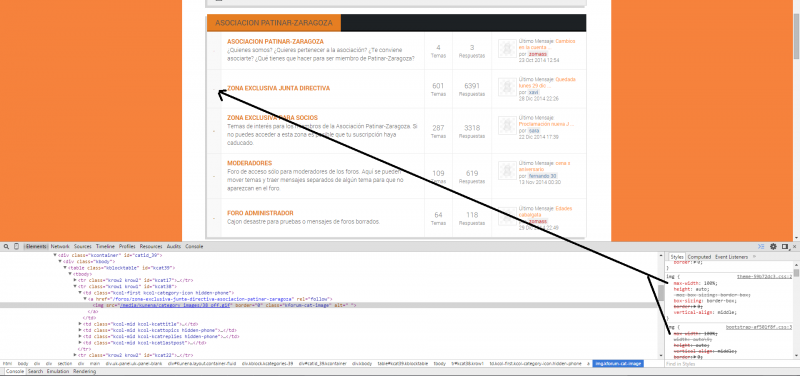
Sorry, this code not run.
Please see the images for more info.
Thanks
Sorry, this code not run.
Please see the images for more info.
Thanks
Please Log in or Create an account to join the conversation.
M
Topic Author
Re: Category image problem
11 years 5 months ago - 11 years 5 months ago
Opppss
The other attachment
The other attachment
Last edit: 11 years 5 months ago by miguel6sep.
Please Log in or Create an account to join the conversation.
Re: Category image problem
11 years 5 months ago - 11 years 5 months ago
Hi,
We have checked on your site. You are using cache function on your site, please try to clear cache on your site to view change.
Regards
We have checked on your site. You are using cache function on your site, please try to clear cache on your site to view change.
Regards
Hung Pham
Email: 9themestore@gmail.com
Twitter: @9themestore
Email: 9themestore@gmail.com
Twitter: @9themestore
Last edit: 11 years 5 months ago by ntstore.
Please Log in or Create an account to join the conversation.
H
hawkeye
New Member


hawkeye
- Thanks: 0
Re: Category image problem
10 years 8 months ago
I've got the same problem but only with chrome, firefox works correctly.
It would be very nice, if you spend a few minutes to this issue
chrome:

firefox:

It would be very nice, if you spend a few minutes to this issue
chrome:
firefox:
Please Log in or Create an account to join the conversation.


Re: Category image problem
10 years 8 months ago
@hawkeye,
Did you your site live? If yes, please provide us the site url. We will debug and provide the correct solution for you.
Best regards,
Did you your site live? If yes, please provide us the site url. We will debug and provide the correct solution for you.
Best regards,
Please Log in or Create an account to join the conversation.
H
hawkeye
New Member
hawkeye
- Thanks: 0
Re: Category image problem
10 years 8 months ago
This site is online, but it's a non public forum 
Please Log in or Create an account to join the conversation.
Re: Category image problem
10 years 8 months ago
Hi @hawkeye,
Create a style file with named nts-kpraxis-custom.css and paste below CSS rules to that file.
Copy the nts-kpraxis-custom.css file to the css folder of current joomla template. Clear cache and refresh your forum on Chrome.
Please let's me know if it does not work.
Regards,
Create a style file with named nts-kpraxis-custom.css and paste below CSS rules to that file.
Code:
body #Kunena td.kcol-ktopicicon a {
display: block;
height: 32px;
width: 32px;
}
Copy the nts-kpraxis-custom.css file to the css folder of current joomla template. Clear cache and refresh your forum on Chrome.
Please let's me know if it does not work.
Regards,
Please Log in or Create an account to join the conversation.
H
hawkeye
New Member
hawkeye
- Thanks: 0
Re: Category image problem
10 years 8 months ago
does not work ...
file ist here: public_html/templates/gantry/css
Gantry is active template.
file ist here: public_html/templates/gantry/css
Gantry is active template.
Please Log in or Create an account to join the conversation.
Time to create page: 0.258 seconds